DANI ALONSO OPTICALFIBER ADAPTERS Technical Inquiry

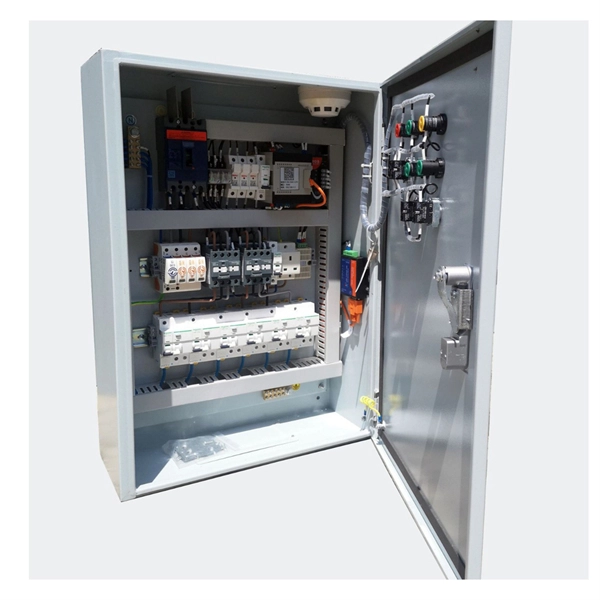
How to disassemble a data center power distribution box

Disassembling a data center power distribution box requires careful isolation of power, modular component removal, and adherence to safety standards to prevent electrical hazards.Safety First

Before any disassembly, ensure complete power isolation. Data center PDUs and distribution boxes may carry high-voltage AC or DC currents. Confirm that all input sources, including utility and backup generators or UPS systems, are disconnected and that the system is de-energized. For DC systems, special attention is required to prevent arcing, as energized disconnection can cause fire hazards . Use appropriate personal protective equipment (PPE), including insulated gloves, safety glasses, and arc-flash-rated clothing.

Step-by-Step Disassembly
  1. Document and Label Connections
    • Record all input and output connections, breaker positions, and cable routing.
    • Label each cable and breaker to ensure correct reassembly or replacement.
  2. Disconnect Output Loads
    • Safely disconnect all IT equipment or downstream loads from the PDU or distribution box.
    • Verify that no residual voltage remains on output circuits.
  3. Remove Modular Components
    • Many modern PDUs and UPS-integrated distribution boxes have modular breakers or rectifier modules.
    • Begin by removing branch circuit breakers, followed by main breakers if applicable .
    • For UPS modules, use the Module Bypass Switch (MBS) to isolate the module before removal.
  4. Disconnect Input Power
    • Disconnect the main input cables from the utility or generator feed.
    • For DC systems, ensure arc detection and quenching mechanisms are in place before disconnecting .
  5. Dismantle the Enclosure
    • Remove screws, bolts, or fasteners securing the enclosure panels.
    • Carefully lift panels to avoid damaging internal wiring or components.
  6. Remove Internal Components
    • Extract internal busbars, monitoring units, or intelligent modules.
    • Handle sensitive electronics with anti-static precautions.
  7. Inspect and Store Components
    • Inspect all components for wear, damage, or corrosion.
    • Store modules and breakers in a dry, static-free environment.
Additional Considerations
  • Follow Manufacturer Guidelines: Always refer to the PDU or distribution box manufacturer's manual for specific disassembly instructions.
  • IEC Standards Compliance: Ensure compliance with IEC 61439-1 for low-voltage switchgear and control gear assemblies .
  • Testing After Reassembly: After reassembly, perform insulation resistance and continuity tests before reconnecting power to ensure safety and reliability. By following these steps, you can safely disassemble a data center power distribution box while minimizing the risk of electrical hazards and equipment damage .
How to disassemble a data center power distribution box

PDU8000 Power Distribution BOX-T Quick Guide (02400ECD)

The surrounding area of the box contains no waste tape, cable ties, paper, or packing materials. Plan the power

Data Center Power Distribution Basics

The power distribution unit is a device designed to distribute electrical power to servers, networking hardware, telecom

How to Remove and Clean Corrosion on a Dodge Ram TIPM

How to remove and clean the integrated power distribution fuse box module under the hood. Over time, being exposed

Technical note

This reference is intended for preliminary fiber optic adapter research. Compatibility, link budgets, connector interfaces, sleeve materials, polish, installation methods, test limits and applicable standards must be verified for the specific project.

Still Have a Technical Question?

Use the inquiry form to describe an adapter requirement, connector interface or testing question.

Start an Inquiry